Which Razer Gaming Keyboard Should You Buy? A Complete Buying Guide
Razer offers something for every budget and playstyle, from entry-level membrane keyboards at £39.99 to high-end mechanical switches at £199.99. The key is matching the switch type, form factor, and price to your actual needs rather than chasing the priciest option.
Why Razer?
Razer has been the dominant force in gaming peripherals since 1998, specialising in keyboards, mice, and headsets engineered specifically for competitive gaming. They're known for proprietary mechanical switch technology—their Razer Green and Yellow switches are industry benchmarks for actuation precision. Most Razer keyboards ship with programmable RGB lighting, programmable macros, and Razer Synapse software for customisation. Unlike generic gaming brands, Razer invests in actuation consistency: their mechanical switches are tested to 80 million keystrokes, twice the industry standard. They also offer tenkeyless (TKL) variants across multiple price points, which appeals to esports players who prioritise desk space and portability.
Top Picks
Razer Blackwidow V4 X — £129.99
Best for gamers seeking reliable mechanical switches without breaking the bank. This 104-key full-size keyboard features Razer Green mechanical switches with a 45g actuation force and clicky feedback. It includes RGB backlighting, programmable macro keys, and a USB cable—no wireless option, but build quality is solid at this price. The V4 X is Razer's most consistent seller because it delivers proven switch reliability at under £150.
Razer Huntsman V2 Tenkeyless — £149.99
Best for competitive gamers and desk space optimizers. The TKL format removes the numeric keypad, saving 20% desk real estate. It features Razer Linear Red switches with 1.5mm actuation distance (faster than clicky switches) and optical actuation technology for minimal input lag. Ideal for esports players who play CS2, Valorant, or fast-paced titles where milliseconds matter.
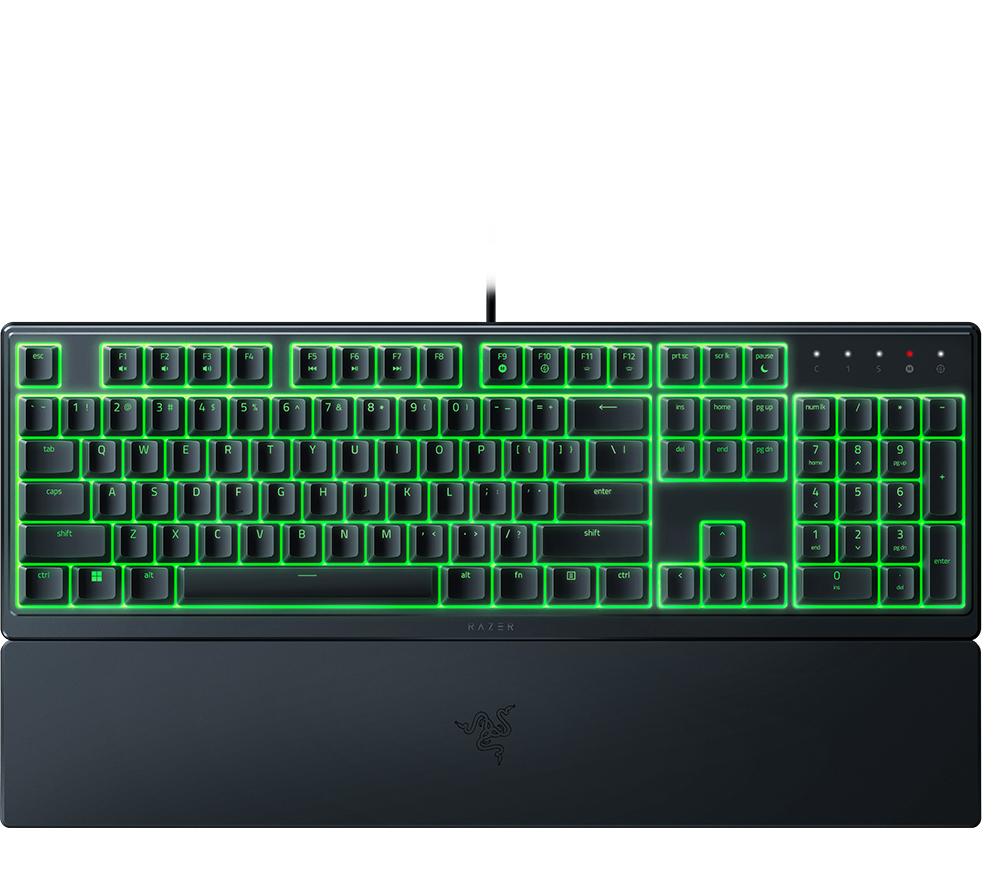
Razer Ornata V3 X Gaming Keyboard — £39.99
Best for budget-conscious gamers and light gaming. This is a membrane-switch hybrid rather than fully mechanical—it uses Razer's Mecha-Membrane technology for a middle ground between typing comfort and cost. RGB backlighting is included; mechanical switches are not. At £39.99, this is Razer's entry point and suits casual players or those testing whether they prefer gaming keyboards.
Razer Blackwidow V4 Low-Profile Tenkeyless — £199.99
Best for professionals and minimalists. At £199.99, this is Razer's most expensive option here, featuring low-profile Razer Yellow switches (45g actuation, linear) and a compact TKL layout. The low-profile switches sit 1.5mm lower than standard ones, reducing finger travel and enabling a slimmer keyboard chassis. Programmable macros and USB-C wired connection included. Suits desk-conscious users who want premium build quality without bulky key height.
Razer Blackwidow V3 Tenkeyless — £99.99
Best for value-seeking mechanical keyboard buyers. This is the budget mechanical option—£99.99 for a TKL with Razer Green switches and RGB backlighting. It's older than the V4 range but still reliable; the £30 saving versus the V4 X makes sense if you prefer TKL and want mechanical actuation.
Quick Comparison
| Product | Price | Switch Type | Form Factor | Best For | |---------|-------|-------------|-------------|----------| | Razer Ornata V3 X | £39.99 | Membrane-hybrid | Full-size | Budget gaming, casual play | | Razer Blackwidow V3 TKL | £99.99 | Razer Green (clicky) | Tenkeyless | Value hunters wanting mechanical | | Razer Blackwidow V4 X | £129.99 | Razer Green (clicky) | Full-size | Reliable mid-range pick | | Razer Huntsman V2 TKL | £149.99 | Razer Red (linear) | Tenkeyless | Competitive gaming, speed | | Razer Blackwidow V4 LP TKL | £199.99 | Razer Yellow (linear, low-profile) | Tenkeyless | Premium compact build |
What to Look For
- Switch type matters: Clicky switches (Razer Green, 45g) are tactile and loud—good for feedback but annoying in shared spaces. Linear switches (Razer Red/Yellow, 45g) are quieter and faster for gaming. Membrane-hybrid switches (Ornata) are quietest but less responsive.
- Form factor: Full-size keyboards include a numeric keypad (useful for productivity); tenkeyless (TKL) saves desk space (sacrifices the numpad). Choose based on desk size and whether you use number entry frequently.
- Actuation distance: Razer specs range from 1.2mm (optical switches in Huntsman V2) to standard mechanical actuation at 1.5mm. Shorter distances = faster input in competitive games; longer = less accidental double-taps during typing.
- Programmability: All Razer keyboards support RGB customisation via Razer Synapse software; macro programming is available on V3/V4 models. The Ornata V3 X has fewer customisation options due to its membrane-hybrid design.
The Bottom Line
The Razer Blackwidow V4 X at £129.99 is the best all-around pick for most gamers—it's mechanically reliable, full-size, and reasonably priced. If you want compact and competitive-grade, the Huntsman V2 Tenkeyless at £149.99 justifies the extra cost with optical Red switches and faster actuation. If you're on a tight budget, the Ornata V3 X at £39.99 is a respectable entry point; if you need premium build quality, the Blackwidow V4 Low-Profile TKL at £199.99 is the most feature-rich option.
Frequently Asked Questions
Is Razer good value for money?
Razer keyboards are fairly priced for gaming-specific features (programmable macros, RGB, mechanical switch durability). Entry-level options like the Ornata V3 X (£39.99) are genuinely affordable; mid-range picks like the V4 X (£129.99) are competitive with other gaming brands. Premium models (£199.99) are more expensive than non-gaming mechanical keyboards but justify the cost through gaming-optimised switch tuning.
What's the difference between Razer Green and Red switches?
Razer Green switches are clicky and tactile with 45g actuation force—they provide audible feedback ideal for typing and feel. Razer Red switches are linear with the same 45g force but smoother actuation with no click—they're quieter and optimised for rapid gaming inputs. Choose Green if you want tactile feedback; choose Red for speed and noise reduction.
Do all Razer keyboards have RGB lighting?
All Razer keyboards listed here include programmable RGB backlighting except for some budget variants. The Ornata V3 X includes RGB but has fewer customisation options due to its membrane-hybrid design. You cannot disable RGB on most models, though brightness can be set to minimum.
Should I buy a full-size or tenkeyless keyboard?
Choose full-size (104 keys) if you use the numeric keypad frequently or have ample desk space. Choose tenkeyless (87 keys) if desk space is limited or you prioritise portability for LAN events. For gaming alone, TKL is often preferred by esports players; for mixed gaming and productivity, full-size is more versatile.